ブラウザの検索フィールドでEnterが効かなくなってしまった時

Chrome/Firefoxにて、検索文字列として日本語文字列を入力し、Enterを押しても検索が出来なくなる事案が発生しました(ちなみに、Edgeは問題ありませんでした)。

このような場合、色々やってみる前に、次の手順をちょっと試してみると良いかも知れません。

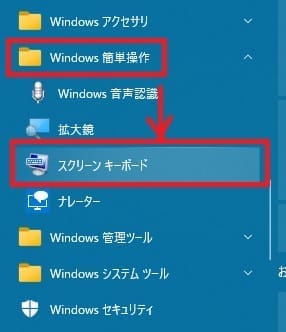
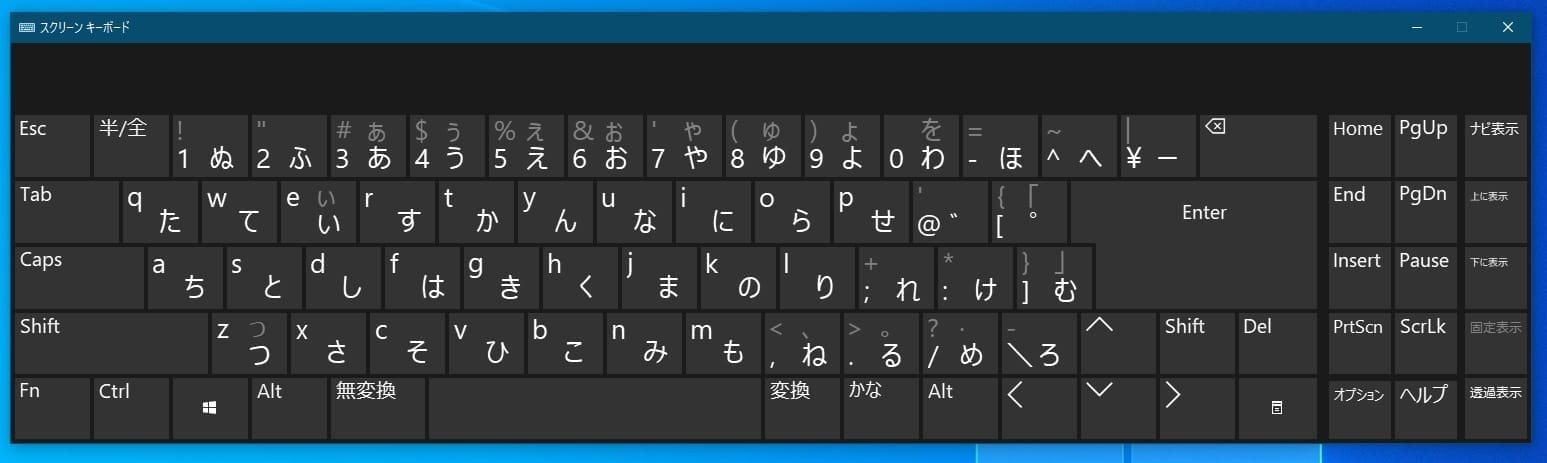
  1. スタートメニュー→Windows簡単操作→スクリーンキーボード、にて、スクリーンキーボードを呼び出す

  2. ブラウザの検索文字列入力フィールドに、スクリーンキーボードから適当な文字列を入力し、スクリーンキーボードのEnterを押す
  3. 検索結果が表示されたら、スクリーンキーボードを消す
  4. 物理キーボードで再度試してみる

This website stores cookies on your computer. These cookies are used to provide a more personalized experience and to track your whereabouts around our website in compliance with the European General Data Protection Regulation. If you decide to to opt-out of any future tracking, a cookie will be setup in your browser to remember this choice for one year.

Accept or Deny