
FortiClientの自動起動を停止する


FortiClientの自動起動が鬱陶しいので、停めてみました。

Windows10 2004と、FortiClient 6.4.0.1464にて確認しています。

  1. スタートアップで起動されていないことを確認する

    確認すべき場所
    • shell:startup
    • スタートアップ アプリ
    • タスクマネージャー→スタートアップ
    • レジストリ
      • HKEY_LOCAL_MACHINE\SOFTWARE\Microsoft\Windows\CurrentVersion\Run
      • HKEY_CURRENT_USER\SOFTWARE\Microsoft\Windows\CurrentVersion\Run
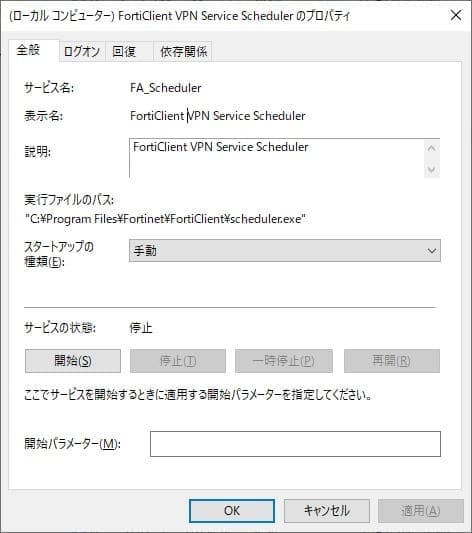
  2. サービスの自動起動を停止

    サービスを起動
    • スタートを右クリック→コンピューターの管理→サービスとアプリケーション→サービス
    • services.msc を直接実行
     など

    FortiClient VPN Service Scheduler を『手動』に変更

以上です。

This website stores cookies on your computer. These cookies are used to provide a more personalized experience and to track your whereabouts around our website in compliance with the European General Data Protection Regulation. If you decide to to opt-out of any future tracking, a cookie will be setup in your browser to remember this choice for one year.

Accept or Deny