
ふと、このSSDはTrimされているのかと気になりました。
まずは、状態の確認をします。
管理者権限のコマンドプロンプトにて、
fsutil behavior query DisableDeleteNotify
を実行。
NTFS DisableDeleteNotify = 0 (無効)
ReFS DisableDeleteNotify = 0 (無効)
となっていれば、Trimは有効になっています。
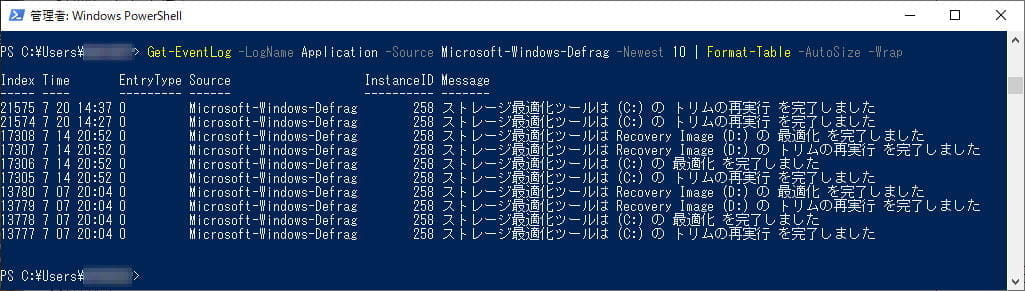
有効な場合、Trimが最後に実行された日時を確認してみます。
管理者権限のPowerShellにて、
Get-EventLog -LogName Application -Source Microsoft-Windows-Defrag -Newest 10 | Format-Table -AutoSize -Wrap
次に、手動でTrimを実行してみます。
管理者権限のPowerShellにて、
Optimize-Volume -DriveLetter [ドライブレター] -ReTrim -Verbose
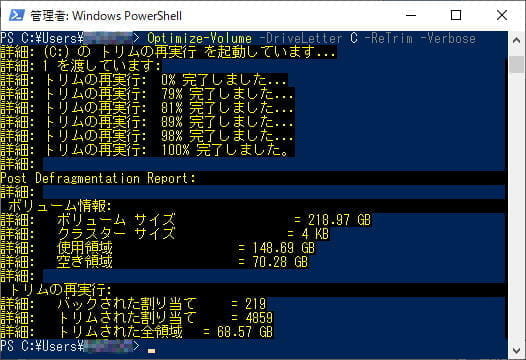
私の環境だと、ドライブ選択→プロパティ→『ツール』タブを選択→『最適化』、では、時間が経つと表示が『未実行/最適化が必要です』に戻ってしまうため、CLIからの確認としました。
